How a senior leader at a Charlotte independent school saved hours per week with automated email triage and an executive command center dashboard.
A member of the senior leadership team at an independent K-12 school in Charlotte was spending hours each day managing emails. With more than 1,500 students and a complex organizational structure spanning board governance, senior leadership, faculty, parents, and vendors, his inbox had become a job in itself. He was manually triaging 40+ incoming emails, including urgent board inquiries mixed in with routine vendor updates, using manual folder management and mental prioritization.
The senior leader's job required strategic focus for budget planning, financial reporting, legal filings, board communications. But instead, he was spending hours every day reading, mentally sorting, and manually responding to emails.
Inbox triage was consuming significant time that could have been dedicated to strategic work.
He needed a system that could automatically categorize emails, flag what was urgent, and give him real-time visibility into his communication landscape.
We built a custom AI-powered email assistant that monitors the senior leader's Outlook inbox 24/7, automatically categorizes every incoming email, and delivers actionable briefings three times per day plus real-time urgent alerts.
Every new email is analyzed by Claude AI via a Zapier automation workflow. The system:
Labels the email using pre-set categories like Senior Leadership, Board Communication, Parent Concern, etc.
Groups the email into Urgent, High, Medium, or Low priority based on sender, content, and context.
Provides an AI summary of the email's content and what's being asked and the required next steps.
AI drafts a reply in the senior leader's voice based on extensive training, ready to approve and send.
AI provides a suggested action or next step for the email, like "Handle directly" or "Forward to IT."
Before the system went live, we trained the AI to understand three critical dimensions of the senior leader's communications:
The AI learned the school's structure: who reports to whom, what issues go to which stakeholders, and how different sender types (board vs. parents vs. vendors) require different handling. This allows the system to make intelligent delegation recommendations based on organizational hierarchy, not just generic "forward to someone" suggestions.
We analyzed the leader's existing email patterns to identify what signals "urgent" vs. "routine" in this specific context. For senior leadership at an independent school, an email from a board officer about budget approval is urgent. An email from a parent about carpool procedures is not. The AI learns these nuances through custom prompts that encode institutional knowledge. The senior leader also provided a list of VIP senders who should always trigger an "Urgent" alert, helping him gain visibility on the communications that matter most.
Draft replies aren't generic AI-generated text—they're written in the senior leader's actual voice. We provided the AI with examples of his email style (tone, sentence structure, typical sign-offs, level of formality) and built custom prompts that replicate his communication style. This makes the AI's draft replies sound like they came from him, not a robot.
This training happens during the first 1-2 weeks of Phase 1 implementation, with ongoing refinement as the system processes real emails and learns from feedback.
Instead of checking email constantly, the senior leader receives structured briefings at:
Review overnight emails before the day starts
Catch up on morning activity and plan for the afternoon
Clear afternoon emails before heading home
Each briefing shows a prioritized list of emails with summaries, suggested actions, and pre-written draft replies with one-click action buttons that allow him to send the draft reply, edit the message, dismiss the email, or mark it as handled.
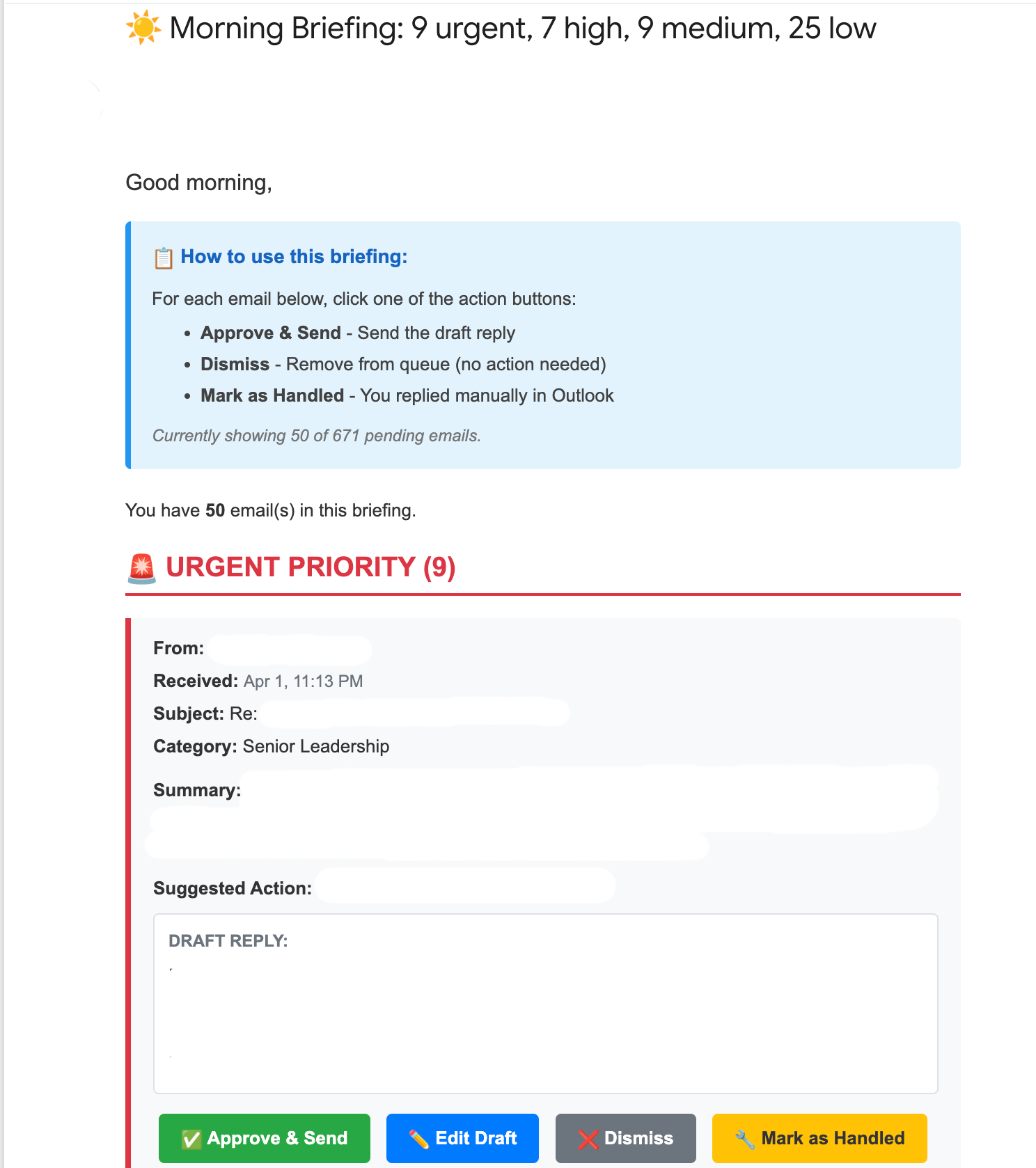
Example morning briefing showing prioritized emails with AI summaries and one-click action buttons
Emails from a custom list of VIP senders (board officers, senior leadership, direct reports) trigger immediate notifications so there is no waiting for the next scheduled briefing. Critical issues surface instantly through a real-time urgent email alert.
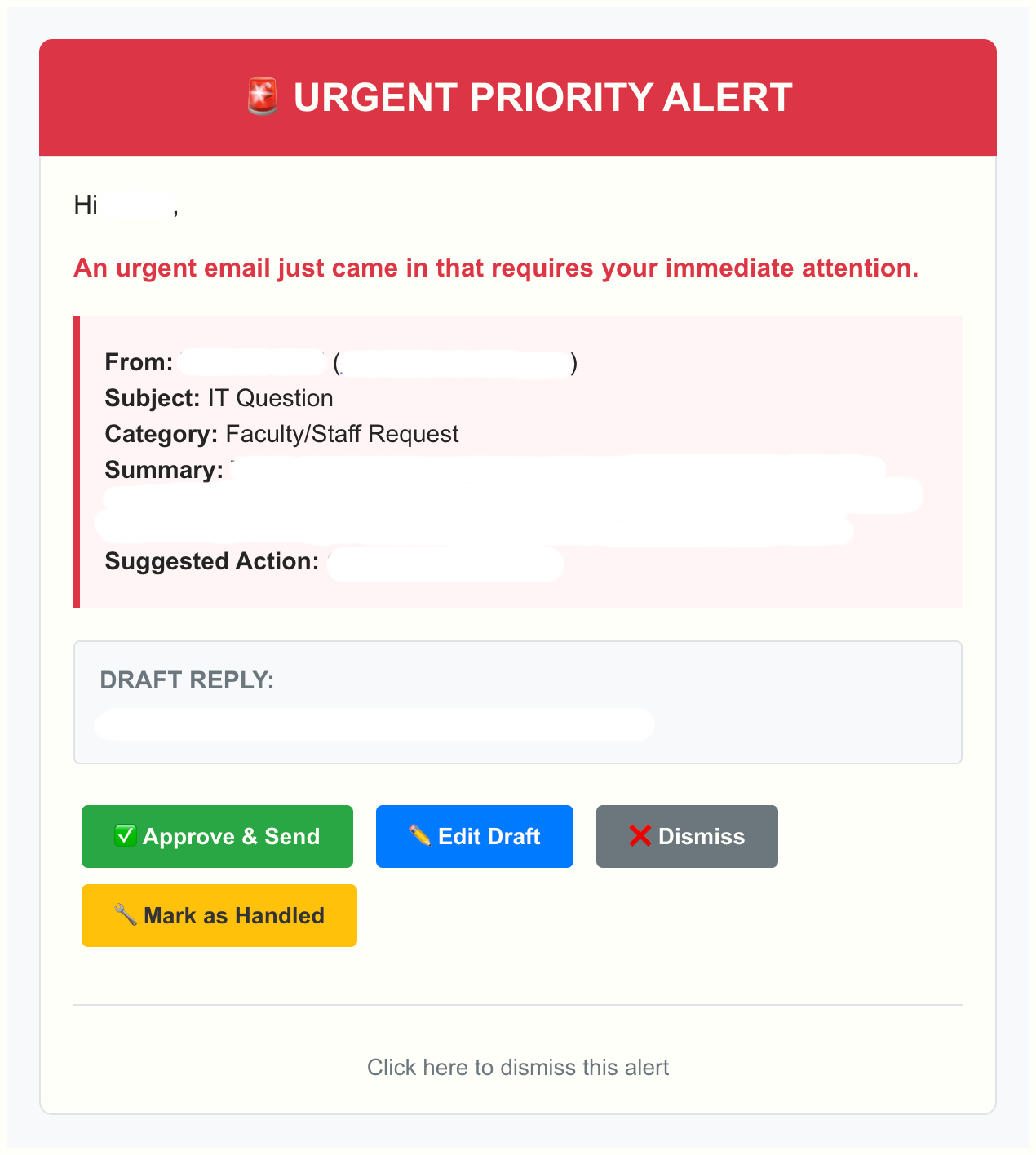
Real-time urgent alert triggered by email from board member
Every email includes four action buttons:
Sends the AI-generated draft reply (with an added confirmation step to prevent accidental replies)
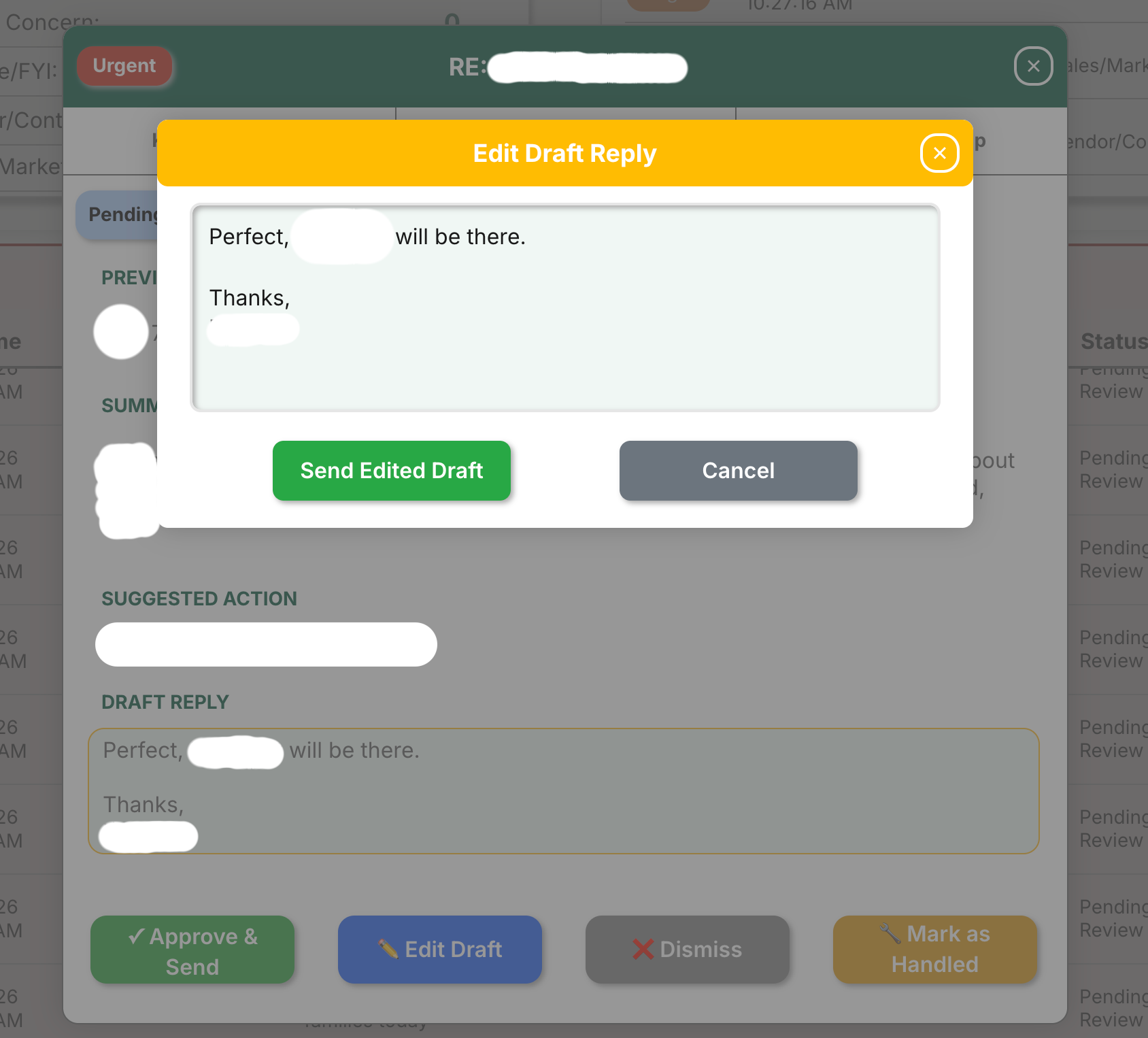
Opens the draft in Outlook for manual editing before sending
Removes the email from the queue and marks it as read in his inbox (no action needed)
Flags the email as handled and marks it as read if already replied to manually
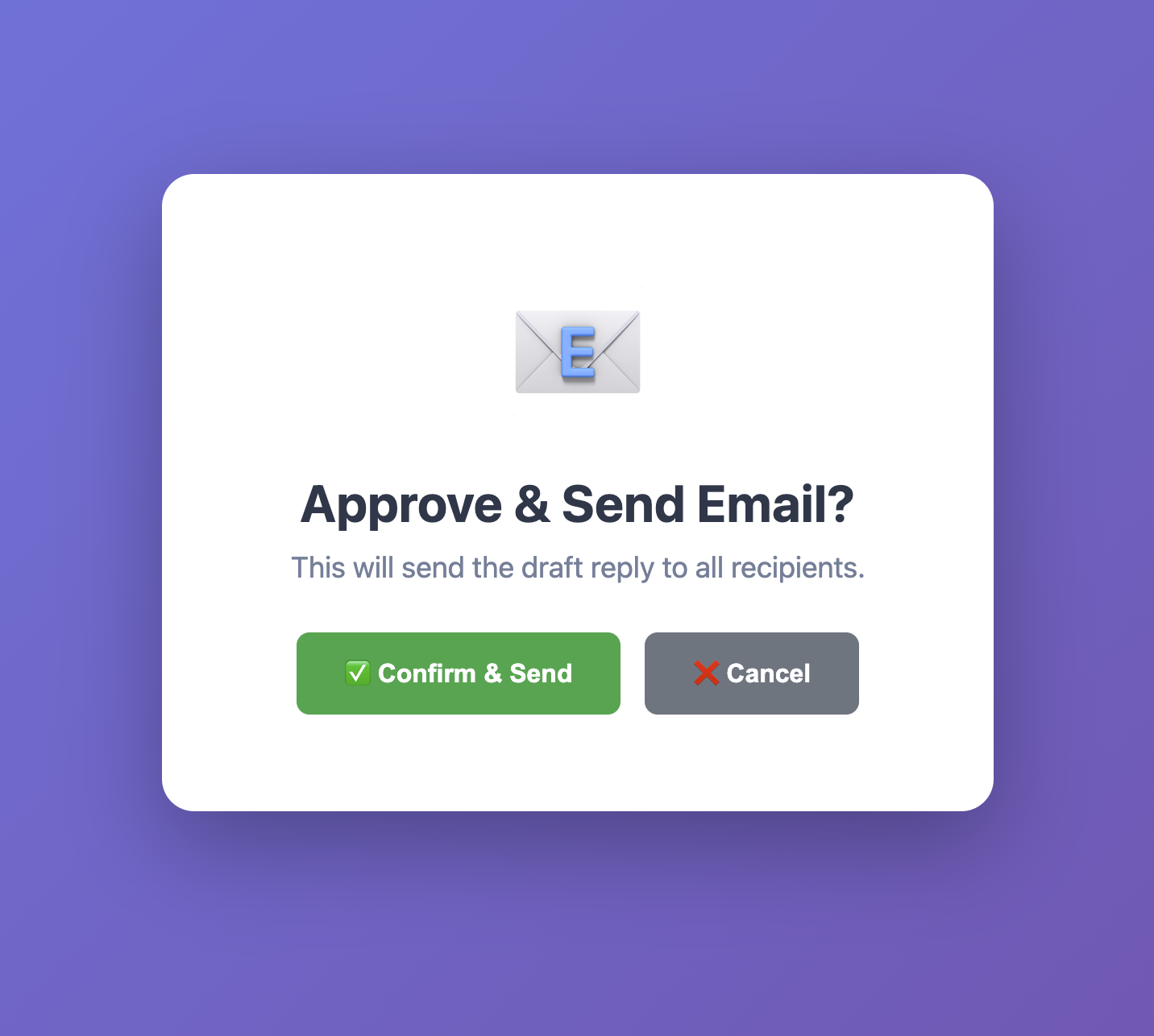
Confirmation screen ensures no accidental replies from Outlook preview
All four action buttons pop a confirmation screen for users to click before the AI takes any action. This helps prevent premature replies from clicks and prevents accidental replies from Outlook's preview function.
Human-in-the-Loop Design: No emails are ever sent automatically. Every reply requires explicit approval. The AI handles triage and drafting; the human makes the final call.
Phase 1 streamlined email management. The senior leader went from manually triaging 42+ emails/day to reviewing structured briefings with pre-written replies. Hours reclaimed, urgent issues surfaced automatically, and high-priority items now visible at a glance.
Phase 1 solved the triage problem. Phase 2 gave the leader something he'd never had before: a real-time, bird's-eye view of his entire communication landscape.
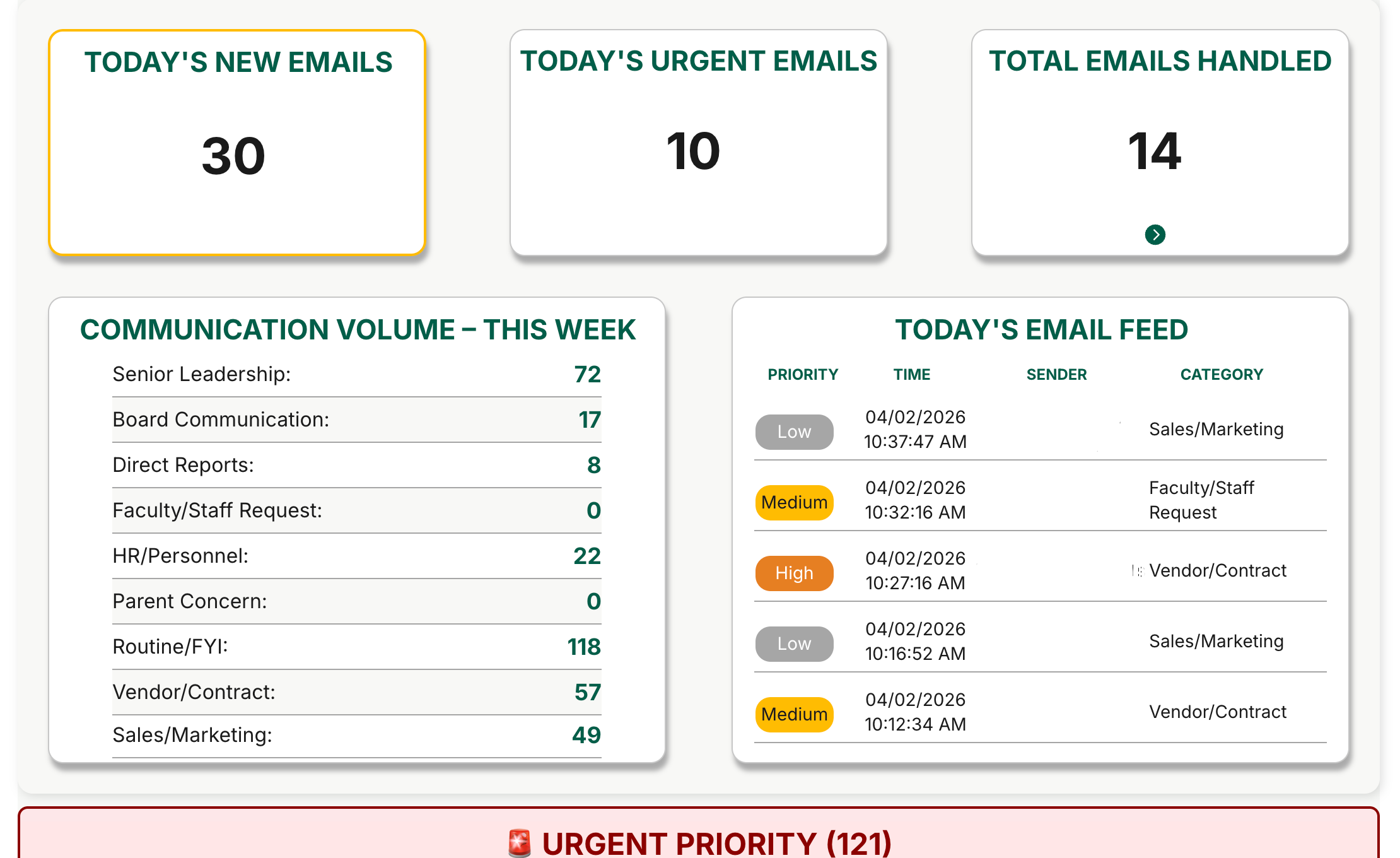
We built a custom web dashboard (powered by Bubble.io) that transforms the email log into an executive command center showing at a glance what's happening in his inbox, what needs attention, and where communication bottlenecks exist.
Command center dashboard with real-time metrics and prioritized email sections
A count of how many new emails arrived today
High-priority items requiring immediate attention
Running count of emails processed by the system
Breakdown of weekly email volume by category
A live chronological view of today's emails for at-a-glance updates
These metrics update automatically as new emails arrive, giving instant visibility into inbox load and communication patterns.
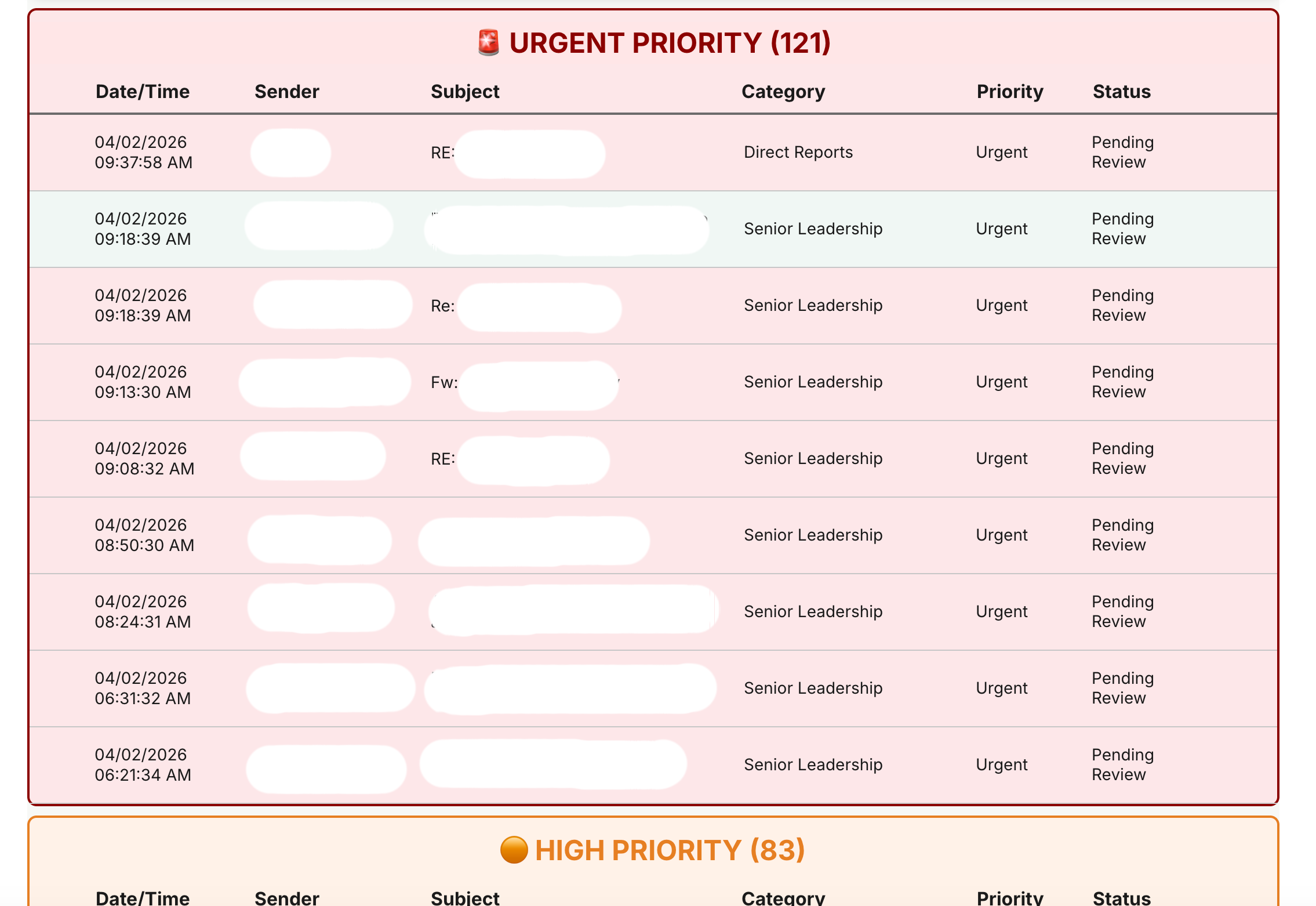
All emails are organized into four priority tiers:
Board members, senior leadership, direct reports
Parent concerns, faculty requests, time-sensitive vendor issues
Routine operational emails, updates from previous threads, follow-ups from meetings
Newsletters, FYIs, non-actionable messages
Emails are sorted newest-first within each section, so the most recent urgent items are always at the top.
Priority sections organize emails by urgency level
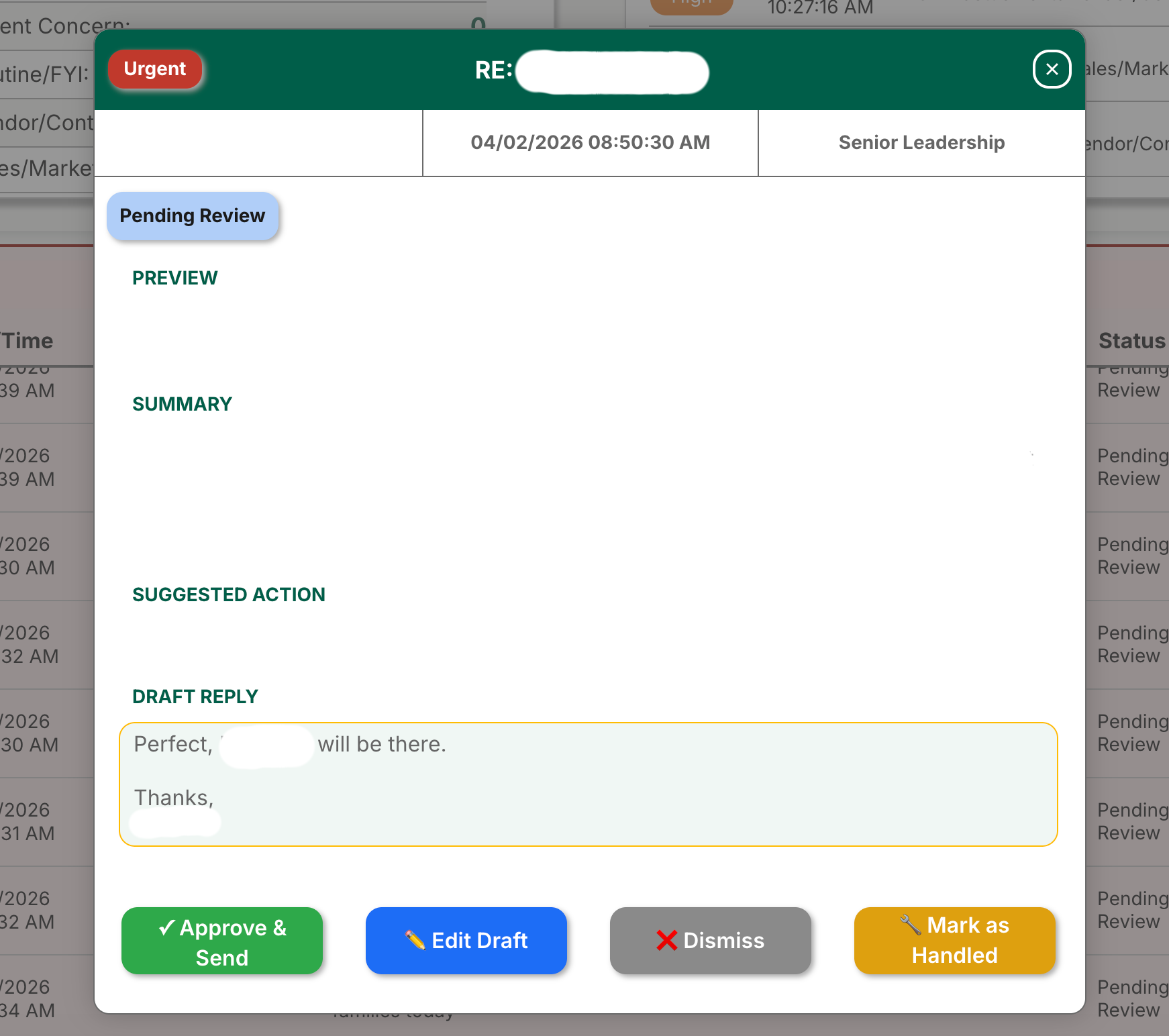
Click any email row and a detailed panel opens showing:
Detail panel displays full email context with AI-generated summary and draft reply
Every email in the details panel has the same four action buttons from the briefings:
Actions update the dashboard in real-time. Click "Approve & Send" and the email moves from "Pending Review" to "Sent" instantly.
Edit draft interface allows customization before sending
Technical Implementation Note: The dashboard connects to the Google Sheets email log via OAuth 2.0 authentication—the most secure method for API access. This ensures that data flows between systems without exposing credentials or creating security vulnerabilities.
Building this integration required custom API configuration in Bubble.io, but the result is a production-grade connection that meets institutional security standards without cutting corners.
The senior leader can now open one browser tab and see: How many emails came in today, which ones are urgent, what categories are spiking (e.g., "22 HR emails this week—what's going on?"), and every pending email organized by priority with pre-written replies ready to approve.
No more hunting through Outlook. No more mental sorting. Just a clean, prioritized command center that shows exactly what needs attention and makes it easier to take action.
Since launching on February 18, 2026, the system has been running autonomously in production processing emails, generating draft replies, and giving the senior leader real-time visibility into his inbox without manual intervention.
Processed, logged, categorized, and a reply drafted as of April 2026
Only 11 errors required manual fixes across the entire run
Error-free, with the last one recorded on March 4th and fixed same day
With peaks of up to 80+ emails on heavier days
The system runs itself and includes automated safeguards to ensure long-term stability:
Moves emails older than 14 days to an archive tab, preventing database bloat and keeping the dashboard fast
Notify the administrator immediately if any workflow fails
Approval prevents accidental sends, every draft reply requires explicit confirmation before going out
Built on enterprise-grade infrastructure with security and compliance at the core:
All email content stays within the school's existing system
Workflow automation with SOC 2 Type 2 certification
AI processing is ephemeral (no data stored), SOC 2 certified
Metadata logging for tracking and reporting, secured by 2FA
Dashboard hosting, SOC 2 certified
Confirmation screens to prevent accidental actions from Outlook preview
All vendors are FERPA-compliant and meet institutional security standards.
Before development began, the complete technical architecture was submitted to the school's IT department for review. The proposal passed their security audit, confirming that the system met institutional standards for data handling, vendor compliance, and integration with existing Microsoft 365 infrastructure. This approval process ensured the build was enterprise-ready from day one, not retrofitted for security after the fact.
The senior leader went from spending hours each day on inbox triage to reviewing structured briefings with pre-written replies. Urgent emails from board members and senior leadership now surface instantly with real-time alerts. The system also improved coordination on high-priority issues by providing a centralized view of all pending items and their status.
Most importantly, the system runs itself. No daily maintenance, no manual interventions, no babysitting. It processes emails, archives old data, and delivers actionable briefings autonomously and reliably, every single day.
If you're a school administrator, executive, or team leader spending hours on email management instead of strategic work, this system can help.
We build custom AI-powered email management solutions tailored to your workflow, your communication patterns, and your organizational structure. Whether you need automated triage for one executive or a command center for an entire leadership team, we can design a system that fits your business and your inbox.
Project builds start at $15,000 (phased implementation). Monthly operational costs run $275–$600/month depending on team size and email volume.
Schedule a 30-minute consultation to discuss your email workflow and explore whether an AI management system makes sense for your organization.
Tired of email overload? Let's connect to explore what a custom AI email management solution could look like for you and your team.